


Back
Quality hold and waste reasons
Quick answer: Quality hold stops stock being sold or picked while you check it, without removing it from stock. Waste reasons make every write-off carry a reason, so the Waste report shows where stock is lost. Both are part of Advanced stock control (Inventory → Settings → Warehouse features, Enterprise).
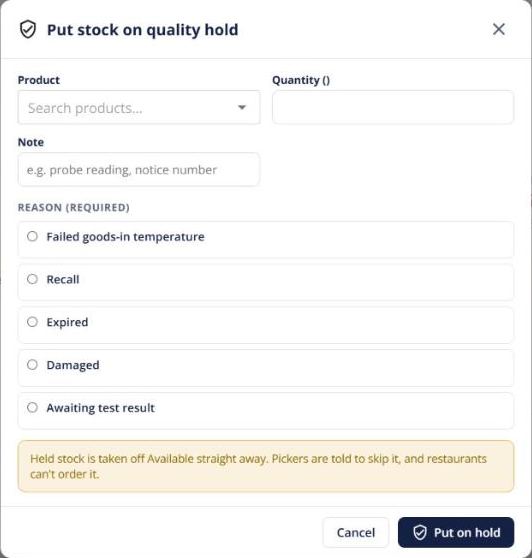
Put stock on hold
- From Inventory → Overview, a product page, or Trace (for a whole lot), choose Put on quality hold and give a reason.
- Held stock is left out of what customers can order, first-expired-first-out picking, waves, scans, load out and transfers.
- On the Quality hold tab, Release it back to available, or use More to Write off or Return to vendor.
Stock can also go on hold automatically — for example when a goods-in temperature check fails or a recall starts.
Waste reasons
Every write-off now asks for a reason (damaged, expired, shrinkage and so on), whichever screen it starts from. Expired lots written off by the system are tagged Expired. Add or switch off reasons under Settings → Waste reasons, and see the totals in Insights → Waste report.