


Back
Recording damaged or short deliveries from your vendors and raising a claim
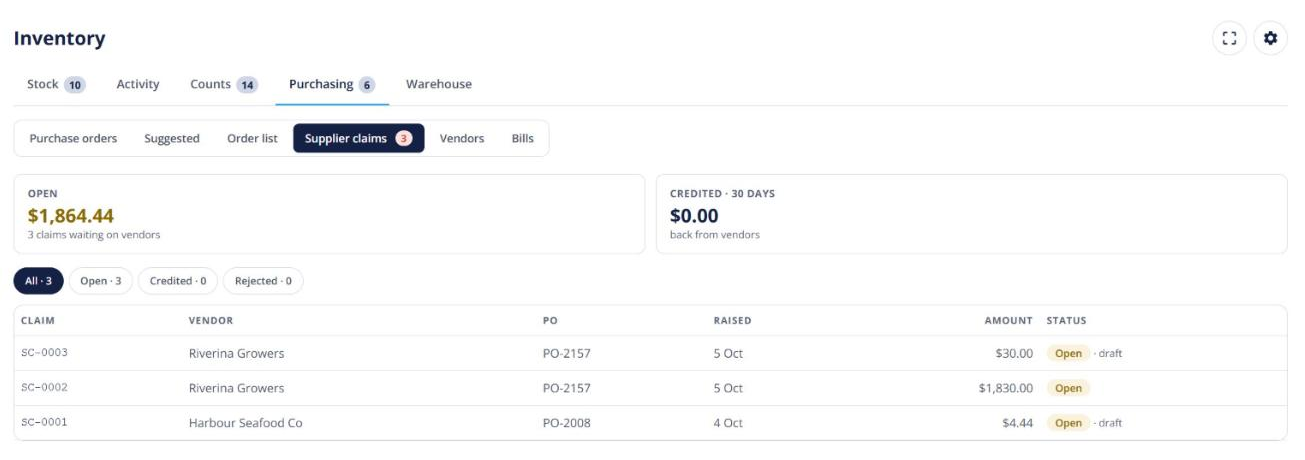
Quick answer: When you receive a purchase order, record anything damaged or short on the line. Open Pantry can raise a supplier claim (numbered SC-…) that you send to the vendor and track until they credit you. Part of Advanced stock control (Enterprise).
When you receive
- Open the purchase order and click Receive.
- Fill in the Damaged, Variance and Reason columns, and add a photo.
- Tick Claim on the lines you want to claim for. You can also enter a probe temperature; a reading over the limit puts that stock on quality hold.
Working the claim
Go to Purchase orders → Supplier claims (a pill shows how many are open). From a claim you can send it to the vendor by email, record their credit, reject it, reopen it or add a note.